Sideyard: one server for every app I build
My friend Rabeeh TA built Sideyard to host the apps we make with coding agents. Fourteen apps share one small server and about 200 MB of memory. Here is why it works.
Abdullah Abdul Samad, . A 4 minute read.
Building got fast. Hosting didn’t.
With Claude Code I can go from an idea to a working app in an evening. Then the old question comes back: where does it live? A database on one service, the app on another, a free tier that sleeps, a second free tier that expires, a card on file for each. For one app that’s fine. For ten it’s a mess, and a monthly bill that keeps creeping up.
My friend Rabeeh TA got tired of this before I did and built Sideyard. I host my own apps on it now, including Kosh, the finance app I use every day.
The one rule
Sideyard runs many small apps on one server you own, and it asks for one thing in return: build on one stack. Go for the API, React for the screen, SQLite for the data. The React app is compiled into the Go binary, so every app ships as a single file.
That sounds limiting until you notice who is writing most of the code. A coding agent doesn’t care which stack it uses, but it does a much better job when the rules are written down. Every Sideyard app carries an AGENTS.md that tells the agent exactly how the app must listen, where it keeps its files and how it reports that it’s healthy. The agent follows it, and the app deploys cleanly the first time.
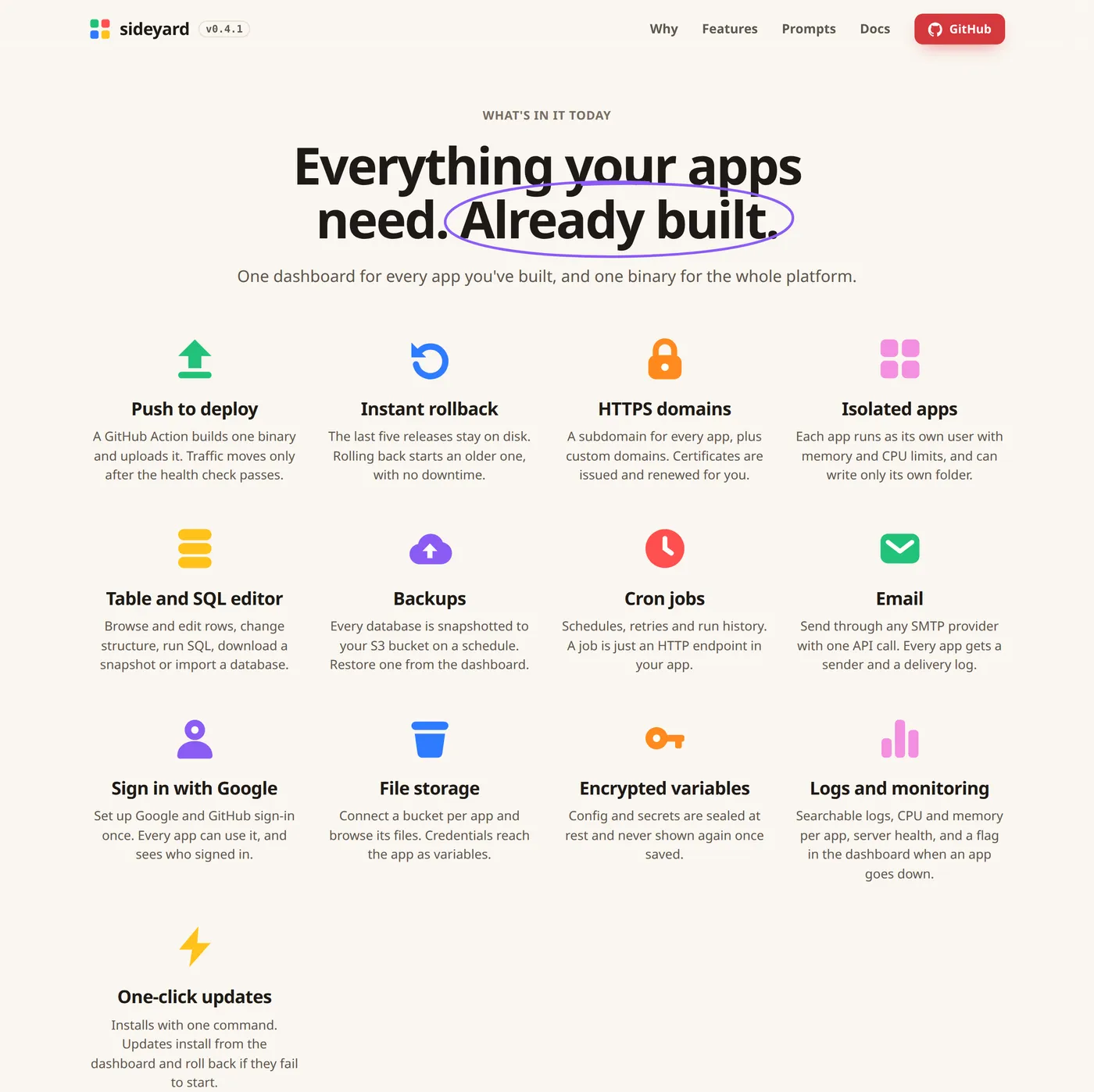
What you get for each app: its own address with HTTPS, a database, backups, scheduled jobs, email, sign-in with Google or GitHub, file storage and logs. A new release only gets traffic after it passes a health check, and the last five releases stay on disk, so rolling back is one click.
How small “small” is
Rabeeh measured it. The same little notes app was written on eight popular stacks, the way a coding agent would write it, and put under the same rising load on one server.
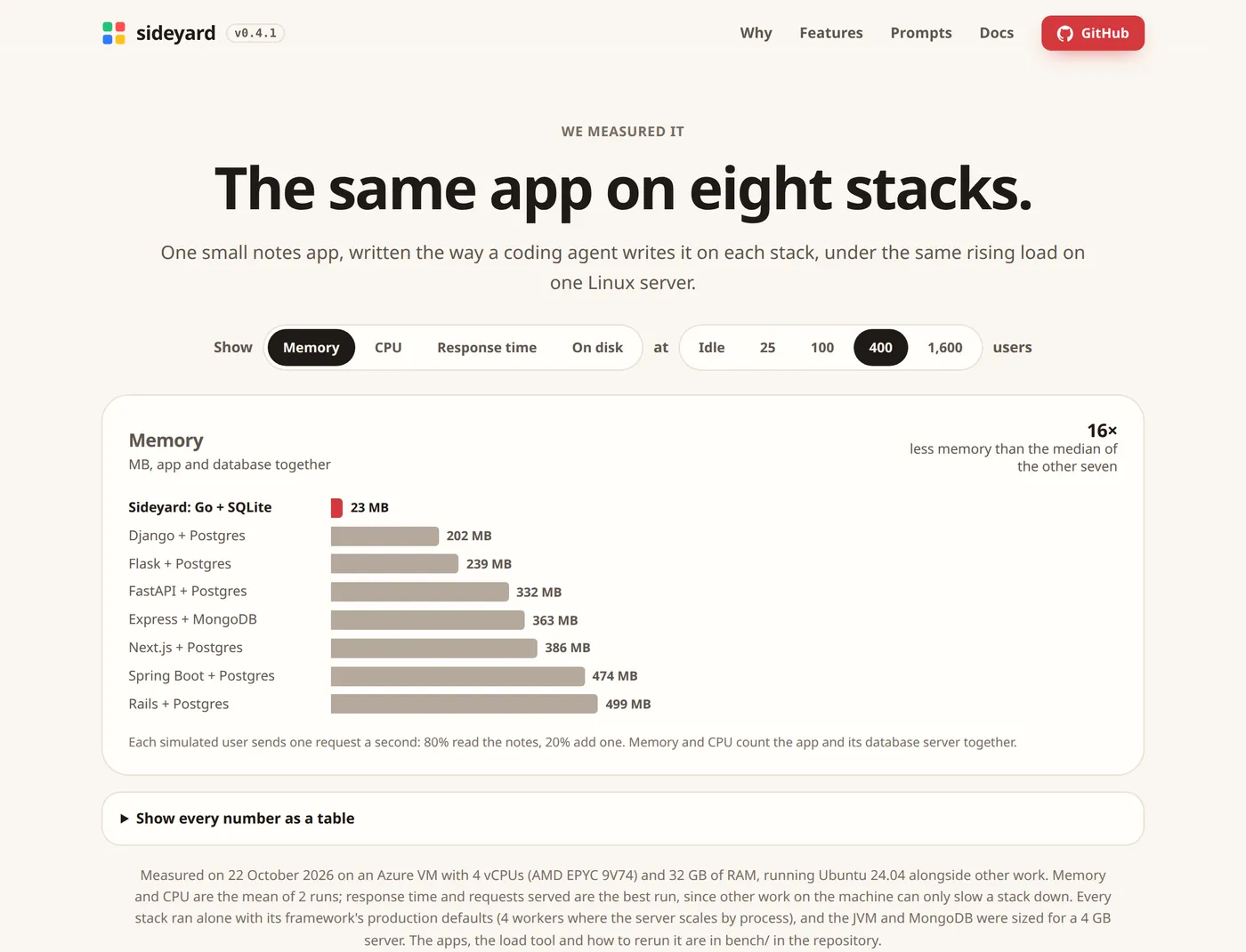
At 400 users, the Go and SQLite version used 23 MB of memory for the app and its database together. Django with Postgres needed 202 MB, Next.js with Postgres 386 MB, Rails 499 MB. That’s sixteen times less than the median of the other seven.
My own numbers say the same thing. The Sideyard server my apps run on hosts fourteen apps right now. All of them together use about 200 MB of memory. Kosh, with every rupee I’ve spent since October in it, uses about 7 MB. IICC Admin uses about 8 MB.
What it costs
Because the apps are this small, the bill is for one server, not for every app.
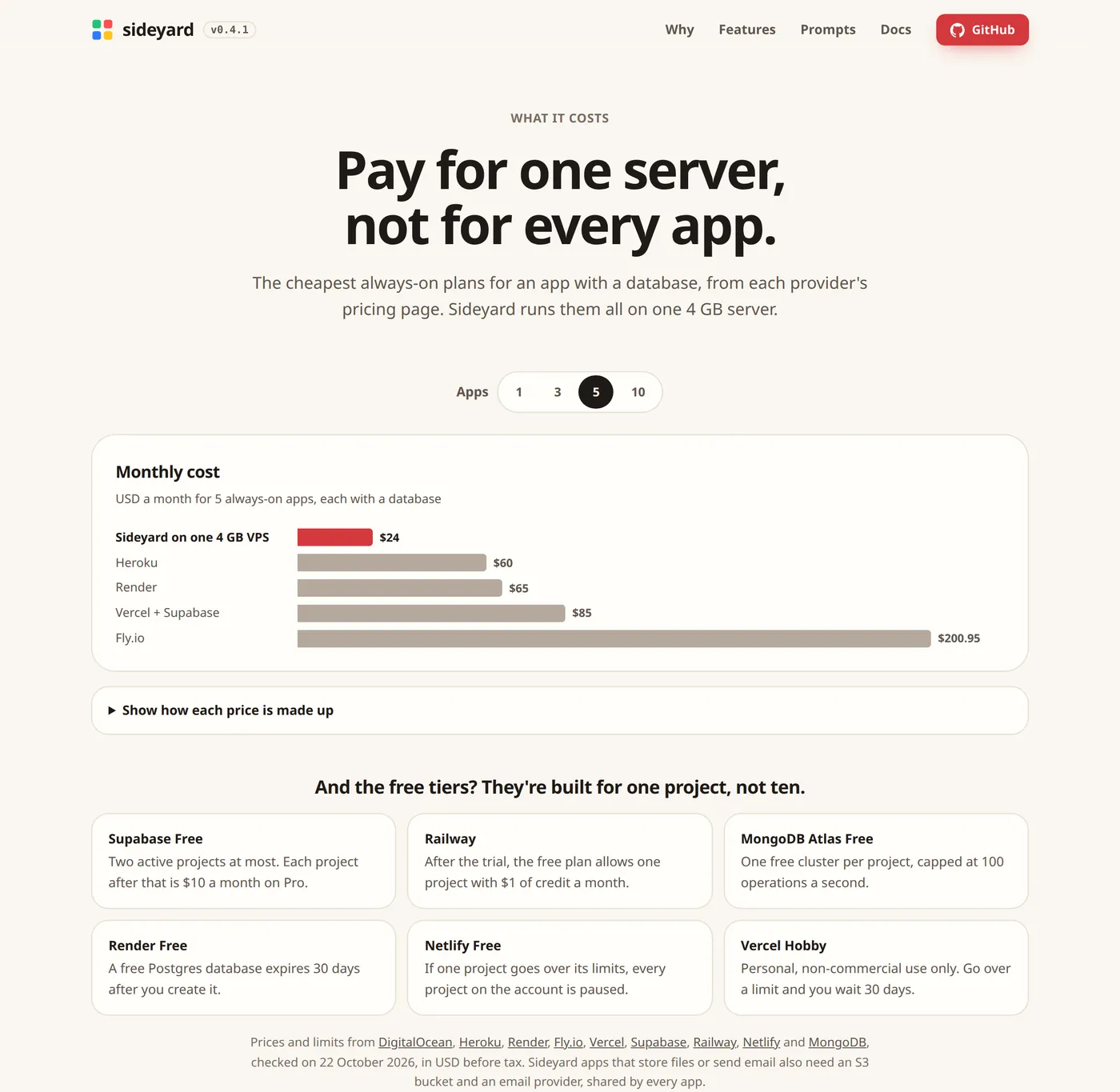
For five always-on apps, each with a database, the cheapest plans on the usual platforms come to $60 on Heroku, $65 on Render, $85 on Vercel with Supabase and $200.95 on Fly.io. On Sideyard it’s one 4 GB server at $24, and the sixth app costs nothing extra.
The free tiers don’t rescue you either. Supabase gives you two active projects. Render’s free Postgres database is deleted after 30 days. On Netlify, if one project goes over its limits, every project on the account is paused. They’re built for one project, not ten.
What you give up
The Sideyard page has a section called “What you give up, honestly”, which is one of the reasons I trust it. No Postgres, no Node or Python at runtime, no Docker, no autoscaling. Backups are snapshots, every six hours by default, so a dead server can cost you up to six hours. Migrations can’t be rolled back. There is one admin.
For the apps I build, that trade is easy. Kosh doesn’t need Kubernetes. It needs to be up, to be backed up, and to cost close to nothing.
Trying it
Point a domain at a fresh Ubuntu or Debian server and run one command. The installer asks for a domain and an admin password, and prints the dashboard address. Sideyard’s page also has two prompts you can paste into a coding agent: one starts a new app the Sideyard way, and one moves an existing app over, step by step, without changing anything until you approve the plan.
If you build a lot of small things with AI, have a look at Sideyard, and tell Rabeeh I sent you.